
Webhooks let TADA notify an external system the moment data changes therefore no polling required. When a user saves data in Tada App (including via a Form), TADA automatically POSTs a notification to any matching endpoint you have registered in Composer.
Table of Contents
- Prerequisites
- How It Works
- Setting Up in Composer
- Testing Your Webhook
- Delivery History
- What Your Endpoint Receives
- Things to Know
Prerequisites
- Access to Composer
- Admin or Super User permissions on the application you want to subscribe to
- An HTTPS endpoint you control that can receive POST requests
Note: Webhooks are configured and managed in Composer only. There is no webhook setup screen in Tada App, Designer, or Organizer.
How It Works
Three parts of the TADA platform are involved:
| Part | Role |
|---|---|
| Tada App | A user saves data — via a Form, direct edit, or bulk import. This triggers a data.updated event on a node or link. |
| TADA WebHooks Service | Runs in the background. Picks up the event, matches it against your active subscriptions, and POSTs a delivery to each matching endpoint automatically. |
| Your endpoint | Receives the POST. For single-row updates, the changed data is embedded in the payload. For bulk updates, the payload contains a signed URL to fetch the full data set. |
The user saving data sees nothing — the delivery happens silently in the background.
Setting Up in Composer
Go to Organize → Web Hooks and click + Add WebHook.
| Field | What to enter |
|---|---|
| Name | A label for this subscription (required). |
| Target URL | The https:// address that will receive the POST (required). |
| Event Types | Select data.updated. This fires on any node or link data write, including Form submissions. |
| Object Kind | Scope to Node, Link, or leave open for both. |
| Object | Optionally narrow to a specific node or link. Leave blank to match all objects of the chosen kind. |
| Auth Mode |
Bearer Token — TADA sends your token as Authorization: Bearer <token> on every delivery. After saving, only the last 4 characters are shown; paste a new value to rotate.None — no auth header sent. Use for internal endpoints or when the URL itself is the secret. |
| Enabled | Toggle on to activate immediately after saving. |
Click Save. The subscription is created and active if Enabled is on.
Testing Your Webhook
After saving, the Test section appears below the configuration form.
- Verify URL — Confirms your endpoint is reachable and returns a 2xx response. Run this before enabling a new subscription.
-
Send Test Delivery — Fires a synthetic
data.updatedpayload to your endpoint right now. The status code, response body, and latency appear immediately. The delivery is also recorded in Delivery History.
Delivery History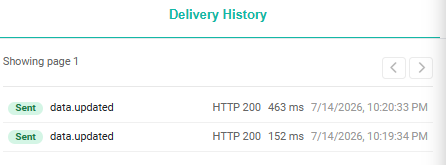
Select a subscription to see every delivery attempt — real events, tests, and replays. Click any row to expand the full detail: payload sent, endpoint response, HTTP status code, latency, and any error message.
Replay resends the original payload to your endpoint. Useful when your endpoint was temporarily down.
Note: Bulk update deliveries cannot be replayed. These payloads contain a one-time access token that is not stored for security reasons. Use Send Test Delivery to verify connectivity instead.
What Your Endpoint Receives
Every delivery is a POST with these headers:
Content-Type:      application/json
X-TADA-Event-Id:   <GUID — use for deduplication>
X-TADA-Event-Type: data.updated
Authorization:     Bearer <token>   (Bearer mode only)
User-Agent:        TADA-Webhooks/1.0
Single-row update — inline
The changed row is embedded directly. data contains every attribute on the node or link. For links, connected node primary attributes are also included.
{
  "eventId":    "9c9f5e08-...",
  "eventType":  "data.updated",
  "occurredAt": "2026-05-08T14:22:13Z",
  "mode":       "inline",
  "objectKind": "Node",
  "objectName": "SalesRegion",
  "data": {
    "Revenue": 42000,
    "Region":  "Northeast",
    "Status":  "Active"
  }
}
Bulk update — pull
For larger updates, the payload contains a signed URL. Call it with the included token to fetch the full updated data set. Token expires in 30 minutes.
{
  "eventId":    "9c9f5e08-...",
  "eventType":  "data.updated",
  "occurredAt": "2026-05-08T14:22:13Z",
  "mode":       "pull",
  "objectKind": "Link",
  "objectName": "OrderLines",
  "data": {
    "url":       "https://<tada-api>/Data?modelname=...&resourceName=...",
    "method":    "GET",
    "token":     "<JWT, valid 30 minutes>",
    "expiresAt": "2026-05-08T14:52:13Z"
  }
}
Branch on mode to handle both cases: read data directly for inline, or call data.url with Authorization: Bearer <data.token> for pull.
Things to Know
- Deliveries are fire-and-forget — TADA does not retry on failure. Use Delivery History to replay missed events.
- Your endpoint must return 2xx or the delivery is logged as failed.
- TADA waits up to 20 seconds for a response. Acknowledge fast and process async if your logic takes longer.
- Use
X-TADA-Event-Idto deduplicate if your endpoint receives the same event more than once.
Related: Composer | Integrations & Setup